
PLANNED CAPABILITY · LOCAL SIMULATION · NOT RELEASED
OWNER BILLING WORKSPACE · RECREATED WEBSITE VIEW
See what’s due.
Know who’s following up.
Practice reviewing an invoice and planning the staff follow-up. Fictional data, separate decisions.
SYNTHETIC BILLING · WEBSITE SIMULATION · NOT RELEASED
Review the invoice. Give staff a next step.
Local simulation · No provider connected. Practice actions do not update Salesforce or process payments.
PAYMENT FACTS
Simulated invoice
$149.00
Last reported amount due
Invoice open · Latest attempt failed
View invoice details
- Reference
- SIM-KPAY016-INV-001
- Invoice
- Open
- Latest attempt
- Failed
- Sync
- Current
- Observed
- November 3, 2026
- Academy payout
- Not confirmed
Staff reviews never change these invoice facts.
NEXT ACTION
Staff follow-up
No staff review yet.
Actual development capture and scope
Actual Salesforce development capture · Synthetic invoice and staff review. The authenticated Owner desktop sequence created, completed and reopened one review. Invoice facts were identical before and after.
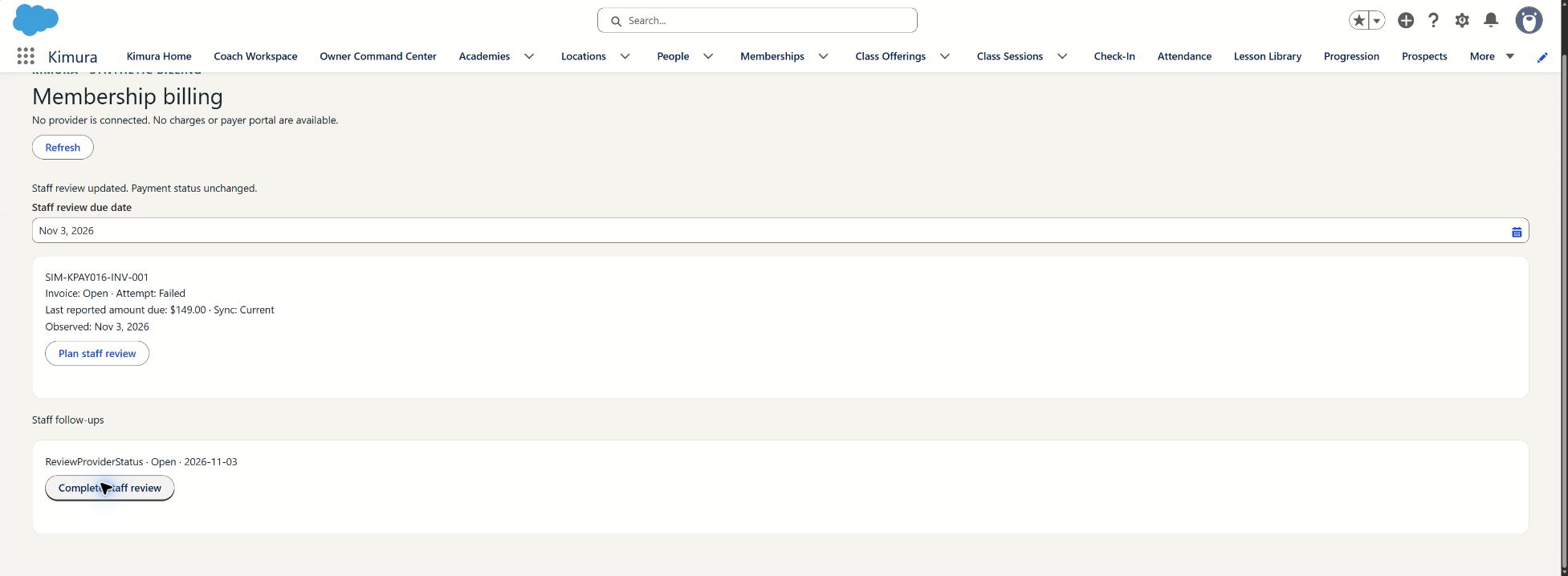
The two-panel presentation above is a website recreation using fictional invoice and staff-review data. Development-org evidence is recorded separately. Physical-device, screenreader and wider recovery coverage remain pending. See Product status for the current scope.
Billing authority remains separate from guardianship, child-information access and pickup permission. This example adds no attendance or pickup restriction.
Real collection, connected merchants, subscriptions, receipts and payer portal remain planned.
ACTION WALKTHROUGH · PLANNED & SIMULATED · NOT RELEASED
See each action. Follow the result.
A 65-second narrated recording of the recreated website demo responding to actions. Fictional data; not actual Salesforce footage or connected payment processing.
Choose play to load the film. AI-generated narration; sound follows your device volume.
Read the action walkthrough transcript
0:00 · Review the invoice
Try a sample invoice in this planned, simulated billing workflow. These are recreated screens. The balance is one hundred forty-nine dollars; the failed attempt does not add another balance.
0:11 · Create and complete a review
Choose Plan a review, then add the review for the billing owner. Complete it after the staff check. The review becomes Completed, while the invoice stays open with the same balance.
0:21 · Refresh and replay a notification
Continue to invoice refresh. Deliver the simulated paid notification and watch the balance become zero. Payment to the academy is still unconfirmed. Replay the delayed failure alert: the invoice stays paid and the staff review stays completed.
0:36 · Check payer authority
Open the payer example and check the guardian’s access. Access is denied because this guardian has no billing authority. No payment-provider session opens. Billing permission is separate from child information and pickup permission.
0:51 · Try it for your academy
You have reviewed an invoice, completed a staff task, refreshed its status and checked payer access. These website actions do not process payments. Billing is not released. Try the guided demo, or discuss your academy’s workflow.
Download transcriptTry these actions in the demo ↑ · Compare the original narrated overview ↓
Open the previous action-film framing for comparison ↗
Planned and simulated · Not released · Recreated website UI, not actual app footage. No real payment, payout or permission decision.
Explore advanced billing scenarios Staff access, notifications and payer authority
PLANNED & SIMULATED · NOT RELEASED
Try more billing examples
Try different access levels, invoice examples and payment updates. These fictional records are separate from the guided demo above. Changing or resetting one example does not change the other.
PLANNED STAFF ACCESS · SYNTHETIC FIXTURES
What can I do in this example?
Choose what this fictional billing Owner can do. This changes the demonstration only; it does not sign anyone in or grant access.
How access works in this concept
These examples represent a billing Owner with required amount access and optional review-management capability. Missing required financial-field access blocks the workspace; this is not a front-desk redacted view. Only the current assignee can update a review. Guardianship, payer authority and staff billing access remain separate. This website does not enforce production authorization.
In a real academy, ask the designated administrator to review required billing access. This website cannot grant permissions.
These choices change sample information only. The example uses October 30, 2026 at 12:00 UTC as its clock; information older than 15 minutes is shown as out of date for this demonstration.
USD • Failed and overdue invoices belong to one attention queue; never add overlapping balances twice. Paid invoices are not academy payouts.
ATTENTION QUEUE
One next action.
No attendance or pickup restrictions are applied.
BILLING ACCOUNT · DEMO-BILL-1
DEMO Adult BJJ membership
- Authorized payer (fixture)
- DEMO Billing Adult
- Invoice (simulated)
- Latest attempt (simulated)
- Snapshot freshness
- Last simulated sync (UTC)
- Academy payout
Built around the right boundaries.
This is a browser recreation of the completed local billing prototype. It is not an actual Salesforce screenshot or a deployed integration. Invoice facts and staff tasks stay separate. A paid invoice does not confirm a payout, and billing status does not authorize or restrict attendance or child pickup.
Connected processing and a payer portal remain planned. Guardianship, staff access, child portal access and billing authority are separate permissions. The identity selector illustrates this distinction; it does not implement production authorization.
Billing remains in development. Passing engineering checks or installing development components does not mean the workflow is available to academies. Connected payment processing is still planned.
Technical details for your IT team
For implementation planning only. No provider is connected and these options are not released integrations.
The proposed Salesforce storage design separates billing context, invoice snapshots and staff follow-ups. The Salesforce billing workspace remains in development. Validation or deployment alone does not establish access isolation, workflow acceptance or availability to academies. Connected payment processing remains planned.
Guided billing day · Simulated
GUIDED PRODUCT CONCEPT · RECREATED SCREENS
Work through a billing day.
Try four planned billing steps with fictional data. No provider is connected. This demo is separate from the advanced simulation below.
PLANNED & SIMULATED · NOT RELEASED · NOT AN ACTUAL APP CAPTURE
Recreated concept · Fictional data · No live transaction
Watch the action walkthrough ↓ · Compare staff access states ↓
Discuss your academy’s billing workflow.
Bring your questions about invoicing, staff follow-up and payer authority.
Choose a conversation →